Minimal CMake
In order to generate the project, we will use cmake. This tool will generate a build system of your choice using configuration files named CMakeLists.txt.
You can launch cmake using the basic command cmake, or use the GUI apps like ccmake or cmake-gui.
Requirements
You will need:
- A cmake installation (supported versions)
- An install of Qt 6 (you can find the installer on the qt website)
- A compiler (supported versions)
The version 6 of Qt requires at least c++17, in the following example we will ask for c++20 because why not.
Minimal cmake project
First we will need to initialize the cmake project.
Technically, for a minimum project need only a single CMakeFile.txt and your source files.
But for this project, we propose the following structure:
qml-template
    ├─ CMakeLists.txt #will be called the `root CMakeLists`
    └─ src
        ├─ CMakeLists.txt
        └─ qmlApp
            ├─ app
            ├─ assets
            ├─ widgets
            └─ CMakeLists.txt #will be called the `app CMakeLists`
This structure will be used all along this course, but feel free to use your own.
If you followed the proposed folder structure, you will need to add a CMakeLists in the src folder that contains the following line:
add_subdirectory(qmlApp)
To do that, we need at least the following lines in the root CMakeLists:
cmake_minimum_required(VERSION 3.21)

project(qml-template LANGUAGES C CXX VERSION 1.0.0)
You will also need to have at least a library or an executable, but we will see that in the next part.
Find Qt
As any other third parties, we will need to first find it using a find_package.
To do that, you can add the following line in the root CMakeLists
find_package(Qt6 6.8 REQUIRED COMPONENTS Core Qml Quick Widgets)
If Qt is not found, you will have to set the Qt6_DIR manually.
Usually the path is /path/to/qt/dir/{qt_version}/{compiler}/lib/cmake/Qt6.
With qt_version the full version (ex: 6.8.6) and compiler the name of the compiler used (ex: gcc_64)
To set it in the cmake build, you can either:
- Use cmake-gui
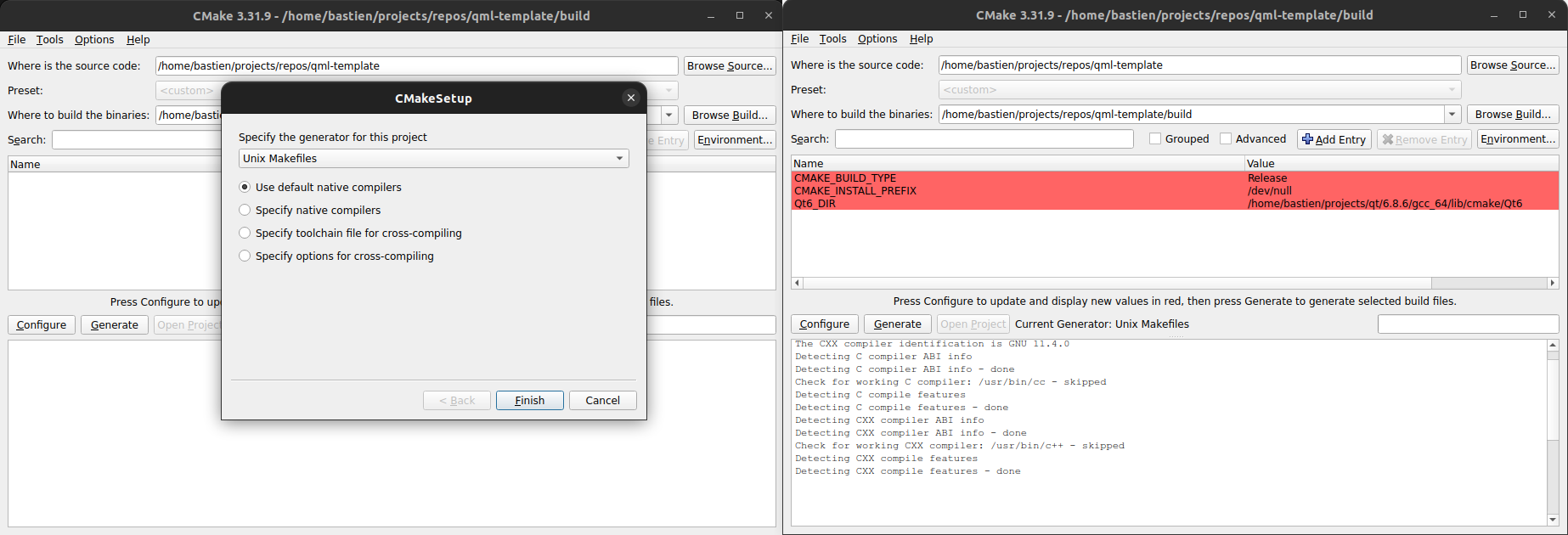
- Add the option in the cmake command:
cmake . -DQt6_DIR=/path/to/qt/dir/{qt_version}/{compiler}/lib/cmake/Qt6
Setup project
Once the library is found, we will need to call qt_standard_project_setup in order to set the default values of some cmake variables (see the full list here)
Thanks to this function, we no longer need to set CMAKE_AUTOMOC or CMAKE_AUTOUIC as we did when using Qt5.
In the end, here is the full content of the root CMakeLists:
cmake_minimum_required(VERSION 3.21)

project(qml-template LANGUAGES C CXX VERSION 1.0.0)

set(CMAKE_CXX_STANDARD 20) #Qt6 requires at least cpp17
set(CMAKE_CXX_STANDARD_REQUIRED ON)

find_package(Qt6 6.8 REQUIRED COMPONENTS Core Qml Quick Widgets)
if(Qt6_FOUND)
    message(STATUS "Qt found, version ${Qt6_VERSION}")
    qt_standard_project_setup(REQUIRES 6.8)
endif()
If you followed the proposed folder structure, you will need to add another line:
add_subdirectory(src)
This line will notify cmake that there is a CMakeLists in the given folder (here the src folder)
So this gives us the following code:
cmake_minimum_required(VERSION 3.21)

project(qml-template LANGUAGES C CXX VERSION 1.0.0)

set(CMAKE_CXX_STANDARD 20) #Qt6 requires at least cpp17
set(CMAKE_CXX_STANDARD_REQUIRED ON)

find_package(Qt6 6.8 REQUIRED COMPONENTS Core Qml Quick Widgets)
if(Qt6_FOUND)
    message(STATUS "Qt found, version ${Qt6_VERSION}")
    qt_standard_project_setup(REQUIRES 6.8)
endif()

add_subdirectory(src)